
Dashboard tour
A quick map of your Zavo dashboard — what every tab does and where to find things, so you always know where to go.
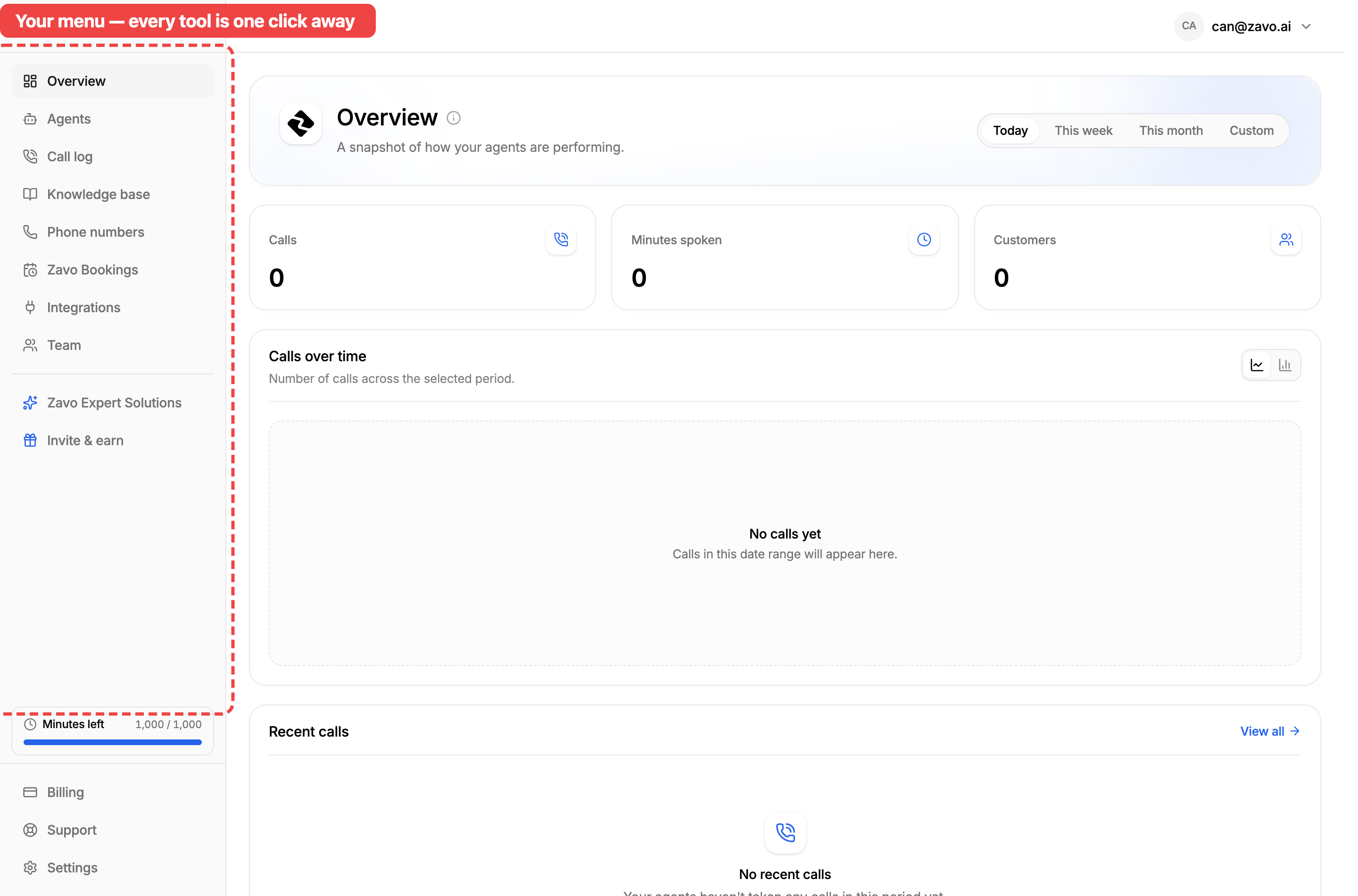
Before you build your first agent, here's a two-minute tour of your dashboard. Everything lives in the menu on the left — this guide walks through each tab and what you'll find inside, so you always know where to go.
On your phone?
On a small screen the menu is tucked behind the menu icon (☰) in the top corner — tap it to slide the same menu in, then tap any tab.
The main menu
These are your everyday tools — the things you'll use to build, run, and keep an eye on your agents.
- Overview — Your home screen. A snapshot of how your agents are doing: calls handled, minutes spoken, customers reached, and your most recent calls. Start here each day.
- Agents — Where you create and manage your AI agents. Build one from a ready-made template or from scratch, edit the ones you have, and see which are live. See Create your agent.
- Call log — Every call your agents have handled, with recordings and transcripts. The best place to hear how your agent is doing and spot things to improve. See Improving your agent.
- Knowledge base — The information your agents use to answer questions — your prices, hours, services, and more. Upload documents, pull pages from your website, or type it in. See Add a knowledge base.
- Phone numbers — Buy, connect, and manage the numbers your agents answer on, and choose which agent answers each one. See Setup your number and Connect your number to your agent.
- Zavo Bookings — Set up your booking page — event types, availability, and links — so your agents can book appointments straight into your calendar.
- Integrations — Everything Zavo connects to: calendars, CRMs, and the other tools your agents can act on during a call. See Set up actions and integrations.
- Team — Invite teammates into your workspace and manage who can access what.
Your account
Down at the bottom of the menu you'll find the bits that keep your account running.
- Billing — Track your usage and minutes, manage your plan, and view your past invoices.
- Support — Opens a chat with the Zavo team whenever you need a hand, right inside the dashboard.
- Settings — Manage your account and workspace preferences — your organisation details, your password, and more.
That's the whole map
Wherever you are, the menu is always one click (or one tap) away. Now you know where everything lives — next up, let's build your agent.
Next: set up your agent
Ready to go? The rest of this section walks you through it, step by step — starting with your knowledge base. 🎉